Breadcrumbs: CS 6457
Part 1 - Animation History
Early Non-Interactive Animation
Prehistoric Cave Art
- Archaeologists found cave art with animals having multiple legs in different positions
- Suggests frames of movement (e.g., boar with legs in different stride positions)
- Speculation: Flickering firelight would randomly illuminate different poses, creating primitive animation effect
Shadow Play and Puppetry
Shadow Play:
- Early form evolved over many years
- Human actors or puppets moving in front of light source
- Shadows projected onto viewing surface or translucent backdrop
Puppetry:
- Long tradition dating back at least 4,000 years (possibly further)
- Articulated artifacts controlled by strings, sticks, or directly (sock puppets)
- Labor-intensive: required human performer
- Demonstrates history of animating 3D forms (vs. 2D)
Magic Lantern (1600s)
Technology:
- Projected images using flame light source through painted/stained glass slides
- Used lens system to project onto wall
- Later evolution: mechanical components added to plates
- Multiple glass layers could be moved with levers/dials
- Each animated slide was one-off with specific mechanics
Evidence:
- 1659 sketch of skeleton showing frames of animation for magic lantern slide
Automata
Concept:
- Removed human operator from puppetry, replaced with machine automation
- Similar technology to clocks: gears, levers, wind-up springs, weight-based powering
- Popular antiques, found in music boxes
- Some elaborate examples: automata that can write signatures
Modern Evolution:
- Da Vinci’s mechanical lion plans (recreated in modern times)
- Disney animatronics in theme parks (Hall of Presidents, Pirates of Caribbean)
- Uses computerization with latex skin over robotic frames
- Can perform facial features
Frame-Based Animation Devices
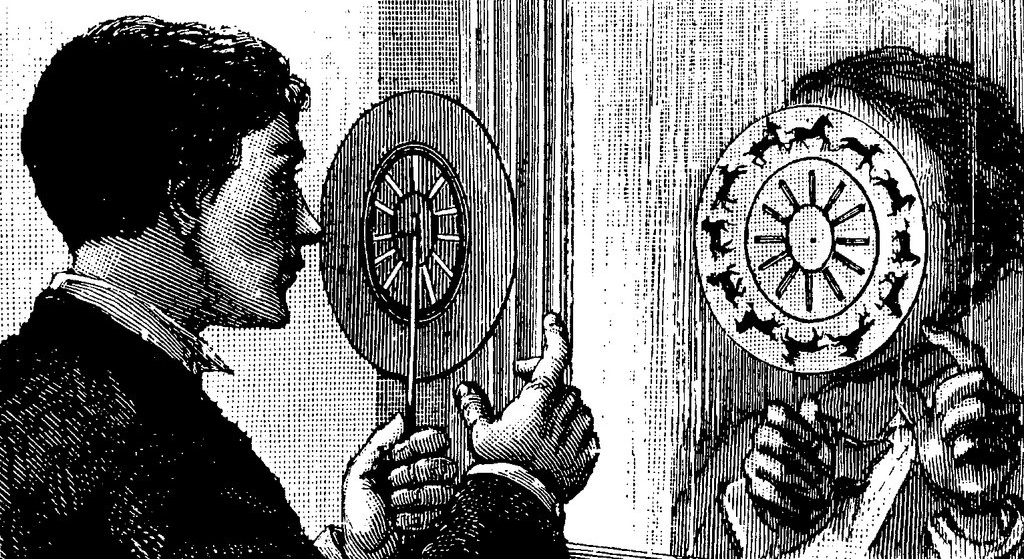
Phenakistoscope (1833)
Mechanism:
- Pinwheel with radial slits cut into perimeter
- Hold up to mirror with artwork facing away
- Look through slit while spinning
- Each slit aligns eye with one image at a time
- Frames are curved shapes (non-rectangular)
Content:
- Limited narratives: man riding horse, bird flying
- Single figure in motion
Zoetrope
Improvements over Phenakistoscope:
- Eliminated need for mirror
- Cylinder shape instead of disc
- Look down at angle through slits
- See one frame at a time
- Animation speed controlled by spin rate
Flip Book/Kineograph
Development:
- Came several years after zoetrope
- Hard to date exactly (straightforward concept, possibly experimented with before commercialization)
- Hand-drawn early examples
- Later versions used original photography
Film and Early Cinema
Film Camera Mechanics
Process:
- Similar to still photography: optics, film exposure, chemical development
- For moving pictures: rapid sequence of frames on film reel
- Film advances one frame, immediately stops (not constant speed)
- Shutter opens after film stops, exposes to light, then closes
- Film accelerates to next frame
- Creates mechanical noise from rapid acceleration/deceleration
Challenges:
- Avoid vibrations during light exposure
- Timing for smooth capture
- Early films had jittery motion due to these difficulties
Arrival of a Train at La Ciotat (Early Film)
- One of earliest well-known films
- Simple: train arriving at station coming toward camera
- Novel experience: first audiences scared, jumped out of seats
- Very influential, spawned entire industry
Cartoon Animation
Fantasmagorie (1908)
- Perhaps one of first cartoons
- Very primitive animation
- Artist created frame-by-frame
- Technology: hadn’t figured out optimal method for getting lines/colors onto film
- Quickly developed and heavily commercialized
Rotoscope (Max Fleischer, 1915 Patent)
Process:
- Projects one film frame at a time (often human form) onto frosted glass
- Artist lays paper over projection and sketches/traces
- Captures each frame one at a time
- Photographs individual drawn frames
- Plays back at appropriate speed
Benefits:
- Gets perspective and dimensions correct following human movement
- Nice smooth animations
- Seamless transitions between rotoscoping and artistic embellishment
Fleischer Studios:
- first use of rotoscoping
- Created Coco the Clown (early example)
- Also made Betty Boop
- Coco could do impossible moves through artistic creativity
Disney’s Use of Rotoscoping
Early Disney Films:
- Used rotoscoping in earliest movies
- Example: Snow White - actress Marge Champion performed all captured footage
- Edges traced using Fleischer’s rotoscope technology
Transition to Live Action Reference:
- Disney moved away from precise rotoscoping
- Filmed actors but used artistic interpretation instead of precise tracing
- Focused on specific aspects: physical performance, facial expressions
- Could exaggerate and have more control than being confined by silhouette constraints
- Example: Alice in Wonderland
Why Disney Abandoned Rotoscoping:
- Snow White vs. Dwarfs comparison shows distinct difference
- Snow White lacks expressiveness and detail compared to dwarfs
- Artistic expressiveness of animator carries through better without rotoscoping constraints
Disney’s 12 Principles of Animation
Most Important Principles:
- Squash and Stretch:
- Ball stretches in direction of travel (approximates motion blur)
- Squashes on collision (exaggerated)
- Stretching during acceleration (not collision-based)
- Applies to objects, facial expressions, human form movement
- Some aspects occur in real life (person squatting before jump, stretching during leap)
- Exaggeration:
- Combined with squash and stretch for great effects
Other Principles:
- Important for storytelling: anticipation, staging, etc.
Early Interactive Animation
Interactive Automata (Late 1800s - Early 1900s)
Found in Penny Arcades:
- Mechanical games with basic analog circuits (relays)
- Examples: fighting figures, bowling, baseball, Rock’em Sock’em Robots, hockey, foosball
- Human-powered interactions
- Combined physical animations (puppet-like) with automata concepts
Simulators
Link Trainer (WWII):
- Flight simulator for pilot training
- Couldn’t create animations of external environment (other aircraft, terrain)
- Focused on instrument panel simulation
- Driven by gears and simple electric signals
- Showed: elevation, speed, airplane angle
- Responded to user controls with tactile feedback
- Elaborate state machine implementation
Aetna Drive-O Trainer:
Technology:
- First-person perspective of driving projected on screen
- Simulated controls: steering wheel, gas pedal, gear change
Classroom Use:
- Multiple students with own steering wheels
- Shared viewing experience
- Respond correctly within time window (like QuickTime events)
- Scoring: contraption punched holes in card, run through card reader for pass/fail
Interactive Feature:
- Special single-projector, single-student configuration
- Film reel advance controlled by user input
- Film paused waiting for correct input
- Wouldn’t continue at full speed until proper input received
- On-screen animation dictated by user controls
Part 2 - 2D Animation in Video Games
Early Video Game Graphics
Vector Graphics (First Video Games)
Dispute over “first” video game:
- Tennis for Two (1958): Made with analog circuits and mechanical relays, drove oscilloscope
- Space War (1962): Ran on PDP-1 with actual CPU, generally considered first true video game
Vector Display Technology:
- Used cathode ray tube (CRT) with electron beam controlled by magnetic yoke
- Beam strikes phosphor-coated glass which glows then decays
- Unlike raster displays (scan lines), vector displays have arbitrary aim
- Two separate voltages control vertical and horizontal direction
- Can toggle beam on/off to draw arbitrary lines
- Advantages: smooth, crisp lines without aliasing
- Used in oscilloscopes and early games like Space War
Raster Display Games
Pong (1972)
- One of first raster display games
- Used discrete logic (not CPU) - wiring logic gates together
- Very limited graphics: could only draw lines or axis-aligned polygons
- Extremely difficult development due to discrete logic constraints
Taito Basketball (1974)
- First game to use sprites
- First game to feature human form on screen
- Sprites: arrays of pixel values copied to different screen locations
- Separated artistic content from programming logic
- Artists could create pixel art, programmers worked with arbitrary sprite data
Text Mode Games
Early Personal Computers (IBM PCs):
- Initially only capable of text mode (for business: documents, spreadsheets)
- No graphical capabilities
- Extended character set included line segments and fill patterns for organizing text
- Creative developers used these to create games
Castle Adventure (1984):
- Everything on screen is a text character
- Character data swapped quickly for animation effects
- Short-lived approach as PCs quickly developed better capabilities
Sprite-Based Animation
8-bit Era (Golden Age)
- Examples: Super Mario Brothers, Street Fighter 2
- Introduced color and animated sprites
- Animated sprites: swapping from one sprite to next in similar poses
Technical Implementation:
- Early systems: sprites referenced color palette (not RGB values directly)
- Limited memory - couldn’t store full RGB frame buffer
- Each pixel had 8 bits (or similar) for palette lookup
- Special hardware support with dedicated channels for efficient sprite copying
- Limitations: maximum number of sprites per frame, rectangular axis-aligned dimensions only
- No sprite rotation until later systems
Aesthetic Legacy:
- Modern games could rotate/scale sprites and use full RGB colors
- Typically don’t for authenticity to 8-bit/16-bit aesthetic
- Limitations of era became part of the art style
Color Cycling (Palette Animation)
Technique for Animating Backgrounds:
- Manipulate palette itself rather than pixel data
- Shift colors in circular buffer within palette range
- Example: waterfall animation - shift blues/cyans through palette positions
- Pixels reference same palette position, but palette colors change
- Effective for: moving water, waterfalls, rain, snow, falling ashes
- Common in PC adventure games of late 80s/early 90s
Alternative Animation Approaches
Dragon’s Lair (LaserDisc Game)
Technology:
- Used analog LaserDisc media with digital indexing
- Avoided some limitations of sprites and other techniques of the era but sacrificed interactivity
- Very high quality graphics (all benefits of traditional animation)
- Computer interpreted joystick/buttons for QuickTime events
- Could jump between scenes quickly if optimized on disc layout
Gameplay:
- Limited interactivity - correct response or death scene
- Extremely popular in arcades, drew big crowds
- Made by Don Bluth (animator who worked on Secret of NIMH, American Tail, Land Before Time)
- Short lifespan - sacrificed too much interactivity as technology improved
Rotoscoped Gaming
Definition: Tracing over live-action footage frame-by-frame for realistic animation
Notable Examples:
- Karateka (1984): Early work by Jordan Mechner, limited frames due to memory constraints
- Prince of Persia (1989): Jordan Mechner’s brother as source for prince, Errol Flynn’s Robin Hood for fighting
- Very fluid animation with enough frames
- More engaged gameplay than Dragon’s Lair
- Movement tied to animations (prevents foot sliding)
- Sacrificed some control compared to sprite-based games
- Another World/Out of This World: Eric Chahi filmed himself, created own rotoscoping tools
- Flashback (1992): Popular, available on Nintendo Switch
Amiga Dragon’s Lair Port:
- Computer-supported rotoscoping for Amiga (and other platforms)
- Vectorized foreground characters from LaserDisc frame-by-frame
- Backgrounds: scans of original artwork
- Fit onto 8 floppies (impressive compression)
- Overlaid 2D polygons/lines on background scans
Early 3D Graphics
Vector-Based 3D
Battlezone (1980):
- Actual vector display with wireframe 3D
- Simplified processing: no occlusion, hidden surface, or polygon sorting concerns
- Drew everything as wireframe
2D Sprites with Scaling/Rotation
Super Nintendo Mode 7:
- Specialized hardware for moving backgrounds
- Could scale and rotate textures
- Used for parallax effects and foreshortening
- Example: Mario Kart track (uneven scaling for depth), Super Mario World Bowser fight Limitations:
- Only intended for backgrounds, not individual sprites
- Required specialized processing
Part 3 - 3D Animation in Video Games
Billboards (2.5D)
Wolfenstein 3D and Doom:
- Ray casting for indoor 3D environments (walls)
- Enemies rendered as 2D textures (billboards)
- Scaled for distance
- Multiple perspectives captured (front, back, left, right, angles)
- Swapped based on viewing angle
Wing Commander:
- Space combat with scaled/rotated sprite spaceships
- Rough look but conveyed 3D spatial dimension
- Many different perspective angles needed
Problem: Huge number of angles needed for full 3D rotation
- Motivated transition to proper 3D models
Quake (Early 3D Animation)
Implementation:
- First to use proper 3D character models
- Keyframe animation at 10 fps (even if game ran faster)
- Each frame: array of ordered vertices applied to triangle mesh
- Triangles reference vertex indices, not actual positions
- Very few triangles/vertices due to memory constraints
Storage:
- Each animation frame stores complete vertex table
- Not scalable - memory consumption explodes with more vertices
- UV texture coordinates map to skin bitmap
Computer-Assisted Animation
Procedural Animation
Definition: Write algorithm to animate object
Best For:
- Straightforward, repeating animations
- Clocks and machinery (cyclic movement)
- Hovercrafts (sinusoidal movements)
- Sometimes easier than authoring system
Example: Uncharted 4 clock tower (likely procedural for gears)
Physically-Based Animation
Definition: Integration with physics simulation
- e.g. masses, forces, inertial properties
- Realistic but difficult to control
Example: Just Cause 3
- Grappling hook attaches characters to exploding propane tanks
- Characters carried off by physics
- Rockets attached to cars for funny effects
Motion Capture (Mocap)
Concept:
- Evolution of rotoscoping for 3D
- Map actual performances to game objects
- Full 3D data captured
- Captures styles, subtle nuances and realism
- You must observe someone do something
- Difficult to edit
Comparison to Rotoscoping:
- Rotoscoping lacks full 3D data
- Could rotoscope from multiple perspectives (manual mocap)
- Modern mocap uses computer vision
Examples:
- Naughty Dog (Last of Us, Uncharted): facial expressions and full body capture
- 4D Boxing (early 90s): possibly rotoscoping from multiple perspectives, very fluid animations
Teddy (1999-2000):
- Draw on screen, generates 3D
- Assumes symmetries and minimal volume
- Intuitive interface for 3D structure creation
- Potential for animation authoring similar to cartoon animation
Skeletal Animation Revolution
Concept:
- Abstract skeleton (wireframe) deforms mesh
- Skeleton stored instead of all vertices
- Mesh can be arbitrarily complex
- Much more memory efficient
Storage Requirements:
- Root bone (hip): 3 or 6 degrees of freedom (rotation only, or rotation + translation for root motion)
- Other bones: 1-3 degrees of freedom depending on joint type
- Keyframes store only skeleton pose (array of floats)
- Can interpolate for arbitrary frame rates
Mesh Deformation:
- Each vertex has weighted list of bones (typically max 2-4 bones)
- Weights determine influence of each bone on vertex
- Example: elbow vertices weighted between upper arm and forearm bones
- Rigging: process of aligning skeleton and assigning bone weights
Advantages:
- Huge memory savings vs. mesh animation (Quake MDL format)
- Works well with animation blending
- Animation portability/reuse (not tied to specific mesh)
- Simplified authoring (work with simple skeleton)
- Inverse kinematics support
Disadvantages:
- Implementation difficulty
- Computational overhead (but can offload to GPU for parallelization)
- Realistic mesh deformations difficult (e.g., elbow self-intersection)
Half-Life (1998):
- One of first games to effectively use skeletal animation
- Enabled in-game cutscenes and novel alien creatures
- Could not have been done without skeletal animation — saved tons of memory
- Non-humanoid skeletons (e.g., tentacle creature)
Advanced Animation Techniques
Squash and Stretch in 3D
Challenge: Traditional animation principle difficult with skeletal animation
Solution:
- Add scaling factors to bones (additional degrees of freedom)
- Add extra bones for body deformation
- Example: Jak and Daxter
- Torso compresses/extends during run cycle
- Body stretches 50% during jump start
- Compresses into ball at apex
- Stretches again during fall
- Daxter’s body reinforces arc of jump
Trade-off: Increased memory for additional degrees of freedom, but achievable
Root Motion
Concept:
- Root bone includes translation (6 degrees of freedom: XYZ translation + XYZ rotation)
- Animation moves character through environment
- Game engine interprets root motion incrementally frame-to-frame
How It Works:
- Detect offset from root motion
- Re-center model to game object
- Game object moves according to animation
- Capsule collider follows animation
Benefits:
- Prevents foot sliding/skating
- Walking/running has sinusoidal speed variation (accelerate when falling forward, decelerate when foot lands)
- Programmatic constant speed looks unnatural (feet sliding around, like as if on ice)
- Root motion from mocap captures this naturally
- Large movements (lunges, attacks)
- Animation moves collider with character
- Physics can restrict movement (e.g., wall collision)
- Authoring benefits
- Artist controls character movement
- Declarative approach (no code needed)
Constraints (Unity):
- Root transform projected from hip bone onto Y plane (ground)
- Can enable/disable per dimension (e.g., XZ only, not Y for gravity)
- Can enable/disable rotation
- Useful for chase camera (avoid shaking)
Animation Blending
Concept:
- Interpolate between multiple animations in real-time
- Weighted average creates smooth transitions
- Maps well to analog controls (joystick)
Example:
- Full forward joystick: 100% running forward animation
- Slight left deflection: 90% forward, 10% hard left turn
- Full left: 100% hard left turn animation
Implementation (Unity Blend Tree/Map):
- Map user inputs (XY joystick) to blended animations
- Define interpolation points in coordinate system
- All declarative, no programming needed
- Works with root motion
Benefits:
- Less authoring/mocap work
- Less storage requirements
- Continuous space of animation types
- Full envelope of character movement
Bunny Hop Problem:
- Occurs when blending dissimilar animations
- Both feet move together unnaturally
- Solution: Animations must be aligned
- Same number of steps in loop
- Feet hit in same order
- Same starting point in cycle
- Clip lengths don’t need to match (normalized timeline)
Animation Masks and Layers
Purpose: Blend dissimilar animations without bunny hop issues
Use Case:
- Upper body: rifle firing animation
- Lower body: walking, running, crouching animations
- Record rifle firing from standing position
- Mask isolates upper body for blending
Benefits:
- Minimize mocap work
- Reduce storage (fewer animation permutations)
- Works with inverse kinematics
Match Targets
Purpose: Align animations precisely with world coordinates
Problem:
- Character jumping to grab ledge
- Player input position varies
- Need real-time correction
Solution:
- Identify target position in animation timeline
- Set world coordinate goal for bone (e.g., hand)
- Apply linear interpolation (LERP) correction over time
- Correction proportional to animation progress
Use Cases:
- Grabbing ledges
- Landing jumps precisely
- Opening doors
- Any animation requiring environmental alignment
Inverse Kinematics (IK)
Forward Kinematics:
- Parent dictates transform
- Children follow in hierarchy
- Standard scene graph operations
Inverse Kinematics:
- Set position of leaf node (e.g., hand)
- Calculate parent transforms backwards
- Non-trivial to compute
Challenges:
- Sometimes impossible to solve
- Ambiguous - infinitely many valid solutions
- Example: Hand reaching flashlight - many valid elbow positions
- Joint wobbling/snapping between solutions
Unity Implementation:
- Built-in IK limited to humanoid extremities
- Can set: left/right foot, left/right hand positions/rotations
- Special “look at” for head
- Position weight and rotation weight control override
Use Cases:
- Pressing buttons at various heights
- Picking up objects
- Adjusting feet on varied terrain
- Character looking at targets (head tracking)
- Authoring: drag hand, arm follows
Technique:
- Play base animation (e.g., button press at waist height)
- Weight ramps up as hand approaches target position
- IK overrides to actual button position
- Weight = 0: animation only
- Weight = 1: IK fully controls
Notable Early Examples:
- Terra Nova: Feet controlled by animation + IK correction, torso hovers on capsule collider
- Trespasser: Dinosaurs use box colliders, ray cast for foot ground detection, extends/bends legs
Retargeting Skeletal Animation
Problem: Mocap skeleton dimensions must match rigged model
Solution: Muscle Space (Unity):
- Define joint limits for each skeleton
- Set defaults, allow overrides in Avatar
- Normalize joint movement in animation keyframes
- Map to new skeleton with its constraints
Effectiveness:
- Generally works 80-90% of time
- May have inter-penetration issues (e.g., Rufus from Street Fighter IV - folded arms)
- Some tools allow corrections
Benefits:
- Reuse humanoid animations across different character models
- Grab animations from various sources
Rotations and Quaternions
Problem with Euler Angles (XYZ rotations):
- Intuitive to think about
- Gimbal lock: certain configurations prevent desired rotations
- Example: First-person shooter looking straight up - can’t turn left/right
Solution: Quaternions:
- Avoid gimbal lock
- Reliable linear interpolation
- Essential for blending animations
Why Game Engines Use Quaternions:
- Can convert quaternion to Euler
- Flexible rotation representation
- Critical for interpolation in skeletal animation